
You Keep Re-Introducing Yourself to Claude
Claude Skills and Claude Projects are not the same thing. Most people use neither correctly.
Every morning, somewhere, someone opens Claude and types a small novel before they even ask their question. Their company name, their tone of voice, what industry they’re in, who their customers are. The same paragraph they typed yesterday. The same one they’ll type again tomorrow.
It’s a bit like hiring an assistant who forgets everything overnight. Technically capable. Perpetually new. Deeply frustrating.
The good news is that Claude has two built-in features designed specifically to solve this, and they work best when you use them together. The less good news is that most people either don’t know both exist, or they pick one and ignore the other, or they spend time debating which one is “better.” That debate misses the point entirely. They’re not the same thing. They don’t compete. They complement each other in a way that, once you see it, seems obvious.
The two features are Claude Projects and Claude Skills. Here’s what each actually does, and why the combination is where things get interesting.
Think of It This Way
A Project is a place. A Skill is a process.
A Claude Project is a dedicated workspace tied to a specific context: a client, a business, a hobby, a side project you’re building. You fill it with everything Claude needs to know about that domain. Files, background information, house rules about tone and format, links to relevant documents. Once it’s set up, every conversation you have inside that Project starts from an informed baseline. Claude already knows your situation. You can skip the morning briefing.
A Skill does something different. It packages up a repeatable process so you don’t have to re-explain it every time. Say you write a certain kind of email every week, or you always summarise meeting notes the same way, or you follow a specific structure when building a report. A Skill captures that process once, and Claude runs it automatically whenever you need it. No copy-pasting the same prompt. No rebuilding the template from scratch. You describe what you want, the Skill recognises the pattern, and it just works.
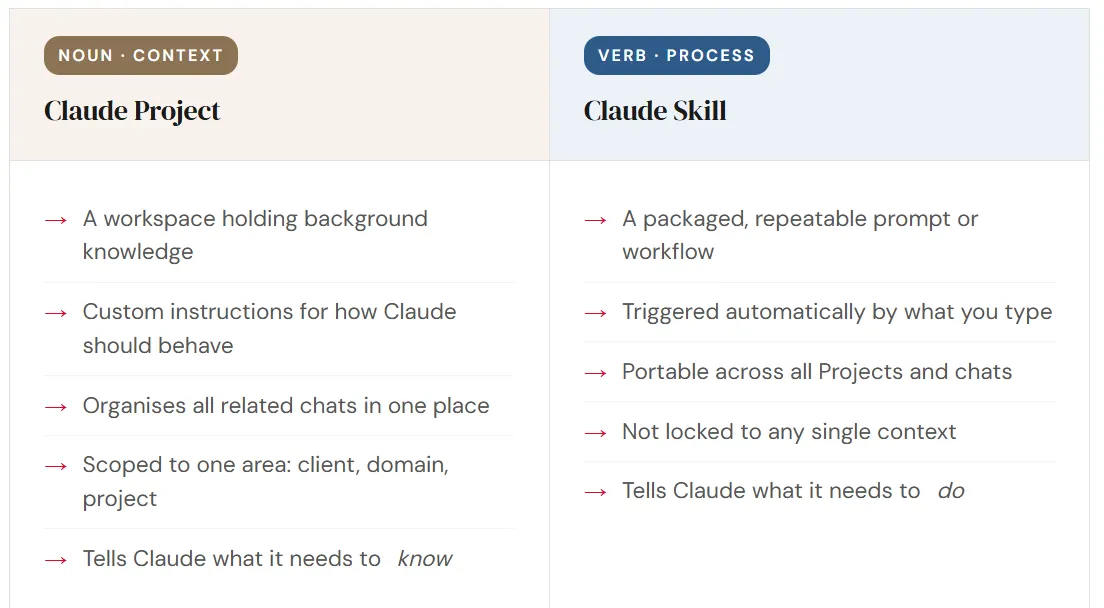
A Project without a Skill is a well-stocked kitchen where nobody has a recipe. A Skill without a Project is a brilliant recipe being cooked with whatever happened to be lying around.
The Kitchen Analogy
Bear with me here, because this one actually helps.
Think of Claude as a chef, and the operator as the person who actually cooks. Your Project is the kitchen: stocked pantry, full fridge, a corkboard with notes about which customers have allergies, a logbook of every dish you’ve made before. Walk in, and the chef knows exactly what they’re working with.
Your Skill is the recipe. A clear, repeatable set of steps that produces the same result every time, regardless of which kitchen you’re standing in. Take that recipe card to any kitchen, and it still works. That’s the whole point of it.
Without the recipe, even a great kitchen produces inconsistent food. Without the stocked kitchen, even a brilliant recipe means the chef has to run to the shop before starting. Both matter. They serve each other.
The Mistake Almost Everyone Makes
People treat these two features as rivals. They ask which one they should build, as if there’s an either/or decision to be made. There isn’t. Skills and Projects live on different layers of the same system, and the gap where most people lose value is precisely the space between them.
A Skill with no Project behind it is a solid process running on thin air. A Project with no Skills attached still needs you to re-explain the task every single time. The combination is where the real efficiency lives, and once you’ve felt it, going back feels genuinely painful.
Put them together and the results are hard to argue with. Ask Claude to write a standard operating procedure for a new internal process. The Skill recognises the task type and applies the right structure. The Project supplies the company context, the tone guidelines, the relevant background. A properly formatted document lands on the first attempt, with no briefing, no copy-pasting, no explaining who you are again. It’s just done.
This is the part people usually call an “AI flywheel.” Each piece of infrastructure you build makes the next task cheaper, faster, and more accurate. Add a document to the Project knowledge base, and every future conversation that touches that area benefits. Build a new Skill, and every Project in your workspace can use it. The returns keep stacking.
Getting Started Is Simpler Than It Sounds
Both features are far more accessible than their names suggest. Claude’s built-in Skill Creator can take a prompt you already use and package it properly, writing the trigger phrases, the instructions, and even quality checks, all from a conversation. You describe what you want to automate, paste in the prompt, and Claude handles the rest. It often improves the original prompt in the process.
Projects are even quicker to start. Create one, give it a name, drop in a few relevant files, write a couple of sentences of custom instructions, and you’re done. The whole first build takes about ten minutes.
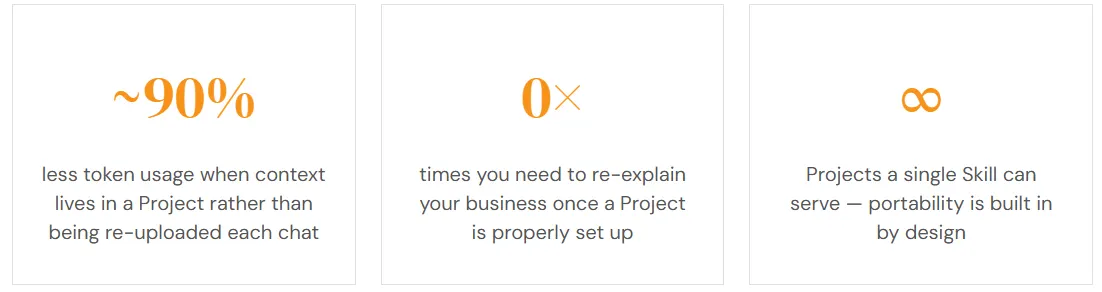
There’s also a practical efficiency point worth naming plainly. Every time you upload a document fresh into a chat, that’s burning through your usage allocation. Put that same document into a Project once, and Claude can reference it across every conversation without the overhead. For anyone who’s hit the “please wait” message mid-afternoon, building Projects is one of the fastest ways to stop hitting it.
A Sequence That Actually Works
If you’re looking at your Claude usage and wondering where to begin, here’s a practical order that tends to produce results quickly.
- Create one Project — Pick the area of your work where you use Claude most often. Add five files that Claude would find useful. Write three sentences of custom instructions about how Claude should behave in that context. That’s the whole first build.
- Find one prompt you use repeatedly — What do you ask Claude to do on a regular basis? Summarise meeting notes? Draft a particular kind of email? Dig it out of your chat history or write it down from memory.
- Package it as a Skill — Open the Skill Creator under “Customize” in the left panel. Paste in your prompt, describe what it should do, and let Claude build the Skill. It’ll add trigger phrases and tighten the instructions. Save it.
- Run the Skill inside your Project — Open the Project and ask Claude to do the task your Skill handles. The Skill runs the process; the Project provides the context. Watch what comes out the other end.
One Project. One Skill. One combined run. Everything else builds from there.
What Actually Changes
The Skills-plus-Projects combination is the difference between using Claude as a glorified search box and using it as something that genuinely knows your situation and operates reliably within it.
Pretty quickly, Claude stops feeling like a stranger you have to re-introduce yourself to every time you open the app. That’s not a feature. It’s just infrastructure. The quiet, unglamorous kind that, once it’s in place, you can’t quite imagine doing without.
And whether or not AI tools ever become part of your professional identity, understanding how the ones you use actually work makes you sharper about when and how to use them. Right now, that kind of clarity is genuinely useful to have.